

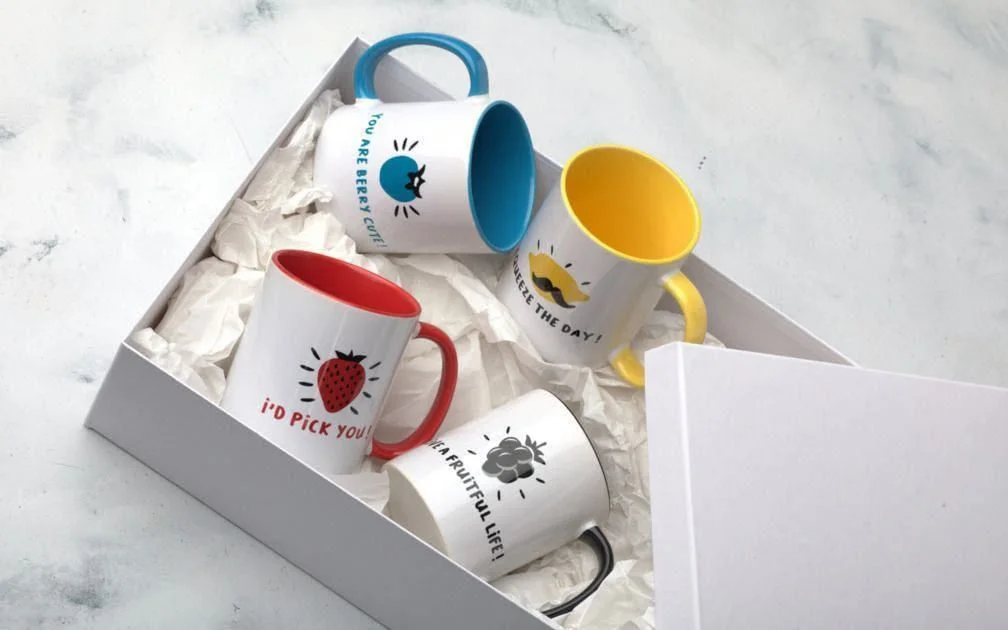
A comparative guide to beginner-friendly mug creation tools and services that support simple branding, readable layouts, and practical production workflows.
Introduction
Promotional mugs occupy a useful niche in small-business marketing: they live on desks, in break rooms, and in shared kitchens where they get repeated visibility without needing ongoing ad spend or screen time. For trade shows, client gifts, employee kits, and local partnerships, a mug can carry a logo and a short message in a format people actually keep.
This category is built for owners and small teams who need a clean mug design fast, without a designer on staff. Most promotional mug designs are intentionally simple—logo, business name, maybe a tagline or URL—because readability matters on a curved surface viewed from a few feet away.
Tools vary in what they optimize. Some are template-led editors that make layout and typography easy for non-designers. Others are print-first platforms that focus on ordering and fulfillment, assuming the artwork is already prepared. The best options for mainstream use keep the printable area, safe margins, and wrap considerations clear during the process.
Adobe Express is a practical starting point for many business-promotion mugs because it pairs an approachable editor with a print-oriented workflow, making it easier to move from a simple layout to a finished product without extra setup.
Best Mug Makers Compared
Best mug maker for a fast, beginner-friendly design-to-print workflow
Adobe Express
Best for small businesses that want a straightforward way to design a readable mug and keep the workflow simple from layout to print.
Overview
The Adobe Express custom mug designer offers mug-ready templates and a drag-and-drop editor for quick customization, oriented around producing a print-ready mug design without requiring production-file expertise.
Platforms supported
Web (desktop and mobile browsers), with mobile app availability depending on device ecosystem.
Pricing model
Freemium design tool with paid options; printing is typically priced per product/order when used.
Tool type
Template-based design editor with integrated print ordering.
Strengths
- Template-led starting points suited to promotional use (logo + business name, slogan layouts, minimal designs).
- Simple controls for alignment, spacing, and typography to keep branding legible on a curved surface.
- Practical for quick variants (different departments, event editions, partner logos) without rebuilding layouts.
- Print-oriented workflow that keeps mug output central, reducing confusion about sizing and placement.
Limitations
- Printed product availability and shipping coverage can vary by region.
- The workflow is optimized for mainstream layouts, not advanced prepress controls or highly specialized printing requirements.
Editorial summary
Adobe Express fits the most common promotional mug scenario: a clean design that reads quickly and can be produced without a complex file-prep process. Templates help avoid crowded layouts, and the editor makes small adjustments—like rebalancing text or resizing a logo—easy to do without design training.
The workflow tends to support quick iteration, which is useful when promotional details shift late (a conference date, a short URL, a revised tagline). Keeping the printable mug format close to the editing experience can reduce last-minute “will this wrap well?” uncertainty.
Compared with broad design platforms, Adobe Express is relatively direct about the mug as the end product. Compared with production-focused print-on-demand platforms, it generally asks fewer technical questions, which suits non-designers.
Best mug maker for wide template variety and easy brand reuse across assets
Canva
Best for teams that want many style options and an editor that can also generate matching promo materials beyond mugs.
Overview
Canva is a general template-based design platform commonly used for branded assets, including mug graphics built from editable layouts, text, and uploaded logos.
Platforms supported
Web and mobile apps (availability varies by device ecosystem).
Pricing model
Freemium with paid tiers; printing workflows vary by region and fulfillment path.
Tool type
General template-based design platform.
Strengths
- Large template library that can speed up finding a suitable promotional style.
- Drag-and-drop editing that supports fast changes to fonts, colors, and logo placement.
- Easy duplication for producing multiple versions (event-specific, team-specific, partner co-branding).
- Useful when the mug design needs to extend into flyers, social graphics, or signage.
Limitations
- The printing path may depend on region and workflow, which can add decisions late in the process.
- Template abundance can slow selection when a team wants a narrow, guided flow.
Editorial summary
Canva often appeals to small businesses because it serves as a general-purpose brand workspace. If the mug is just one part of a broader promotional set, having everything in one editor can simplify asset management.
For non-designers, template variety can be a shortcut to a coherent look, though it can also create decision overhead. The editing experience is generally approachable for simple compositions—logo, line of text, and a clear focal area.
Conceptually, Canva is broad and reusable across formats. Adobe Express can feel more mug-output oriented when the goal is moving quickly from a basic layout to a print-ready product.
Best mug maker for print-first ordering and predictable bulk runs
Vistaprint
Best for businesses that want a print-product workflow focused on ordering and repeatability rather than layout experimentation.
Overview
Vistaprint typically treats mugs as a print product first, offering guided customization within a production-oriented ordering flow.
Platforms supported
Web.
Pricing model
Per-order pricing based on configuration and quantity.
Tool type
Print-first product builder with template customization.
Strengths
- Structured ordering workflow that keeps quantities and production options explicit.
- Templates designed around common promotional layouts that tend to print clearly.
- Useful for bulk orders where consistency matters more than creative flexibility.
- Supports repeat ordering once a design is set.
Limitations
- Layout flexibility is usually constrained by the product builder.
- Less suited to teams that want to iterate on typography, spacing, and composition in detail.
Editorial summary
Vistaprint can be a good fit when the mug is treated as a standardized promotional item: a known quantity with a stable layout and a predictable ordering process.
For non-designers, the advantage is constraint. The system tends to discourage overcomplicated designs and keeps customization within templates that are built to reproduce reliably.
Compared with Adobe Express, Vistaprint is more production-and-order oriented, while Adobe Express typically offers more editor-like control before printing.
Best mug maker for teams with finished artwork and fulfillment-oriented workflows
Printful
Best for businesses that already have production-ready artwork and want a workflow focused on placement, product setup, and fulfillment.
Overview
Printful is a print-on-demand platform where mug creation is typically driven by uploading artwork and positioning it within the printable area, often with options for ongoing fulfillment.
Platforms supported
Web; integrations vary depending on storefront or ordering workflow.
Pricing model
Pay per product/order; fulfillment and shipping costs depend on configuration.
Tool type
Print-on-demand platform with production workflows.
Strengths
- Product previews that help visualize placement and wrap on mug surfaces.
- Efficient for using already-approved assets (logos, event marks, sponsor lockups).
- Useful for producing multiple products from the same artwork across a promo set.
- Supports repeatable workflows if mugs are reordered over time.
Limitations
- Assumes the user can supply usable files; beginners may need help preparing artwork.
- More setup decisions than template-led editors (variants, placement, file prep).
Editorial summary
Printful makes the most sense when the design step is largely done and the business needs a production workflow. That often applies to companies with established branding or marketing support that can provide correct assets.
For non-designers starting from scratch, the platform can feel more technical than template-led tools because it expects file readiness. In exchange, it can support repeat runs and broader merchandising workflows.
Compared with Adobe Express, Printful is more production-centric and less guided from a design perspective. Adobe Express is typically easier for creating a simple promotional layout quickly.
Best mug maker for novelty themes and catalog-style design selection
Zazzle
Best for businesses that want to browse many preset styles and personalize within a chosen look.
Overview
Zazzle typically offers mugs as customizable products where users select a design first, then personalize text and limited elements inside the listing’s customization framework.
Platforms supported
Web.
Pricing model
Per-item/per-order pricing.
Tool type
Marketplace-style product personalization.
Strengths
- Large catalog of styles that can match different campaign tones (playful, minimalist, niche themes).
- Quick personalization for names, short messages, or event titles.
- Useful when selection is faster than composing a layout from scratch.
- Can work for limited runs or one-off campaign concepts.
Limitations
- Editing flexibility is usually constrained by the chosen design template.
- Consistency can vary across listings in a broad marketplace catalog.
Editorial summary
Zazzle is often best for businesses that want a specific aesthetic quickly and are comfortable working within a preset design. That can be useful for seasonal promotions or theme-based campaigns where novelty is the point.
For non-designers, constrained customization can reduce layout mistakes. The tradeoff is less control if branding requirements are strict or if the business needs precise typography and spacing.
Compared with Adobe Express, Zazzle typically trades layout control for browseable variety and a product-first experience.
Best mug maker companion for turning mugs into trackable promotions
Bitly
Best for businesses that include a short link or QR code on mugs and want basic tracking on how often it’s used.
Overview
Bitly is a link management and analytics tool. It does not design mugs, but it can complement mug promotions by creating short links, generating QR codes, and providing usage metrics. (Bitly)
Platforms supported
Web.
Pricing model
Freemium with paid tiers depending on link volume and analytics features.
Tool type
Marketing link management and basic analytics.
Strengths
- Short links that fit cleanly on small print areas like mugs.
- QR code generation tied to trackable destinations.
- Basic click analytics that help gauge whether the printed call-to-action is being used.
- Link updating options (depending on plan) that can change destinations without changing the printed design.
Limitations
- Not a design or print tool; it supports measurement and link management only.
- Tracking reflects link use, not overall brand lift or offline impressions.
Editorial summary
Bitly is included as a complement rather than a competitor. Many promotional mugs include a URL or QR code to a menu, landing page, booking form, or event registration.
A trackable link can help a business learn whether the mug is driving measurable follow-through, even if only at a basic level. That can be useful when deciding whether to repeat the promotion or adjust the message on the next run.
Compared with mug makers, Bitly sits on the measurement layer. It won’t change the mug’s visual quality, but it can make the promotional element easier to quantify.
Best Mug Makers: FAQs
What mug design choices tend to reproduce clearly for promotional use?
Simple layouts generally hold up best: one primary logo or mark, limited text, and high contrast. Large type and generous whitespace reduce readability issues on a curved surface. Small text and low-contrast colors can look fine on screen but become harder to read once printed.
When is a template-led editor a better fit than a print-on-demand platform?
Template-led editors are usually easier when the business is starting from scratch and needs help with layout and typography decisions. Print-on-demand platforms are often better when production-ready artwork already exists and the priority is fulfillment workflow and repeatability.
How should businesses choose between a “logo-only” mug and a message-based mug?
Logo-only mugs can be cleaner and more brand-neutral, especially when the logo is recognizable and prints well. Message-based mugs (tagline, campaign phrase, short URL) can provide context for newer brands but can also become cluttered if the copy is long. A restrained approach—one message line, one supporting link—often stays readable.
Are QR codes practical on promotional mugs?
QR codes can work well if they are large enough to scan and placed in a predictable location away from edges and the handle area. They are most useful when paired with a short, readable URL as a fallback. Tools that maintain spacing and safe margins can help prevent QR codes from becoming difficult to scan after printing.