

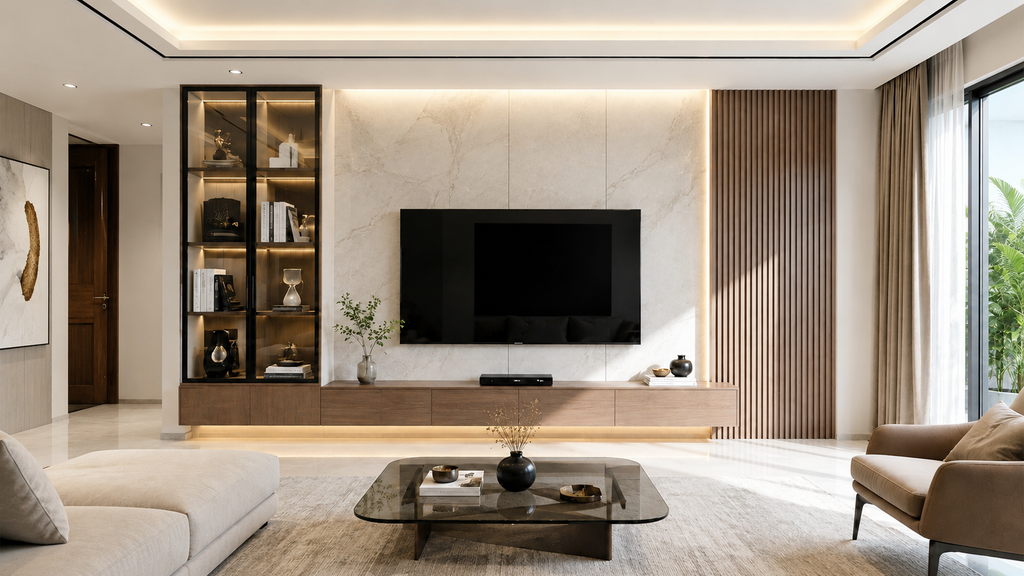
The television may be the most noticeable object in a media area, but it is rarely the reason that corner of the living room looks untidy. Look below it. There may be a router with two blinking lights, a set top box, remotes, charging cables, gaming equipment and wires running towards several sockets. Add a few books, speakers and decorative objects, and a fairly simple TV wall can quickly become one of the busiest parts of the room. The answer is not necessarily to hide everything. It is to decide what should remain visible and what needs a proper place. A well chosen entertainment unit can take care of both, giving electronics room to operate while keeping the smaller objects around them under control.
1. Why a Well-Planned Entertainment Zone Makes Everyday Living Easier
Think about how often somebody searches for the TV remote. It is on the sofa one evening, beside the television the next, and occasionally somewhere nobody remembers leaving it. Charging cables follow much the same pattern. These are minor annoyances, but they point to a larger issue. The media area often has equipment without assigned storage.
A well planned TV zone makes these everyday objects easier to manage. The television has a clear position. Devices can sit close to the screen and electrical points. Remotes have a drawer or shelf. Cables can be kept away from the main surface instead of trailing across it.
Planning also helps with movement around the room. A unit that projects too far from the wall may narrow the passage between the television and sofa. One that is unnecessarily wide can interfere with a doorway or occupy space that would be more useful elsewhere.
Before choosing anything, look at the wall as a working part of the living room rather than an empty surface waiting to be filled. What needs to sit there every day? What needs power? What needs to be reached frequently? Those questions give you a much better starting point than appearance alone.
2. The Common Media Storage Mistakes That Create Everyday Clutter
One of the easiest mistakes is underestimating how many small items gather around a television. The screen itself may require very little space, particularly when wall mounted. The equipment around it is another matter. A router needs a position. A set top box needs one too. Gaming consoles, controllers, remotes and chargers all have to go somewhere.
When a TV unit has no suitable storage, its open surface becomes the default answer. This works for a while. Then another device arrives. A cable is added. Someone leaves a book there. Before long, the surface meant to frame the television has become a general household shelf.
Too much open display space can create the same problem. Empty shelves look useful when furniture is first installed, but there can be a temptation to fill each one. The result is often more visual noise around a screen that already commands plenty of attention.
Cable planning is another area that deserves thought. Electrical sockets, internet connections and the position of individual devices should be considered before the furniture is placed. Otherwise, wires may end up stretching across visible surfaces simply because the required connection is on the opposite side. Small details decide how tidy a media zone remains after the first few weeks.
3. How Smart Entertainment Storage Brings Order to Your Living Room
Useful TV storage usually needs to do two different jobs. Some objects should be easy to reach. Others are better kept out of sight.
A set top box or gaming console may need an open shelf, particularly if a remote signal or regular access is required. Spare controllers, instruction manuals, charging cables and other small items can usually go into drawers or closed sections. This division keeps the area practical without leaving everything on display.
The right arrangement depends on what the household actually uses. Someone with only a television and set top box may need very little storage. A household with speakers, gaming equipment and several connected devices will have different requirements.
This is where comparing Wooden TV Unit Designs at Wooden Street can be useful. Rather than looking only at the overall form, consider how shelves, drawers and closed sections correspond with the equipment that needs to be stored. Check dimensions too, especially if the unit will sit between doors, windows or other furniture.
There is little benefit in choosing several cabinets simply because they provide more storage. Empty storage tends to fill eventually. Start with the equipment and belongings you already have. Then choose enough space to accommodate them comfortably.
4. Choosing Designs That Balance Display, Storage and Functionality
A TV unit has an unusual job. It needs to support technology while also sitting in one of the most visible parts of the living room. That means neither extreme works particularly well.
Too little storage leaves cables, remotes and devices scattered around. Too much cabinetry can make the television wall feel unnecessarily heavy, particularly in a compact room.
Consider what genuinely deserves to be displayed. A few books, a photograph or one decorative object may be enough. Everything else does not have to compete for attention around the screen.
Closed cabinets are useful for belongings that are required occasionally but do not need to remain visible. Open shelves make more sense for devices that need regular access. Drawers are convenient for the smaller objects that are otherwise easy to misplace.
The height of the furniture matters as well. If the television sits on the unit rather than on the wall, its final viewing position should be considered before purchase. If it is wall mounted, check how the unit below relates to the width of the screen and the available wall area. Practical decisions made at this stage can save a lot of rearranging later.
5. Simple Layout Ideas That Keep Your Media Zone Organised
You do not need to fill an entire wall to make the entertainment area feel complete. In a smaller living room, a straightforward TV unit with a few useful compartments may be all that is required. Leaving some wall area visible can prevent the media zone from dominating the room.
Larger rooms may have space for additional cabinets, but those pieces should still have a purpose.

If books, board games, documents or other living room belongings need somewhere to go, Living room storage cabinet designs at Wooden Street can be considered alongside the main TV unit. Keeping related storage close can make more sense than scattering small cabinets around different corners of the room. Before adding one, however, check what will actually be stored inside.
Layout is also affected by where the electrical points are located. Keeping devices close to their connections reduces the amount of visible wiring. Where possible, group equipment rather than placing individual devices across the entire unit. Then give the everyday items a fixed location.
Remotes can share a drawer. Controllers can have another section. Chargers can be kept together instead of remaining plugged in and draped over the furniture when they are not being used. A simple system is usually easier to maintain than an elaborate one.
6. Creating an Entertainment Space That Looks Organised and Feels Complete [Conclusion]
An organised entertainment area is less about decorating the television wall and more about dealing with everything that naturally gathers around it.
Start with the equipment. Count the devices, look at the cables and decide which items need to remain within reach. Then consider what can be stored away. The furniture can follow those needs.
A few open sections may be enough for electronics. Drawers can handle remotes and smaller accessories. Closed cabinets can take care of things that are useful but do not need to be seen every day. And if the household does not require much storage, there is no reason to cover an entire wall with it.
The best test comes a few weeks after the room has been arranged. Are remotes still disappearing? Are wires gathering on the surface? Are devices easy to reach without moving other objects?
If everything has a sensible place and putting it back takes little effort, the media zone is doing its job. The television may still be what people notice first. The lack of clutter around it is what makes the whole area easier to live with.